Create a MoGraph Urban Jungle - Day 1
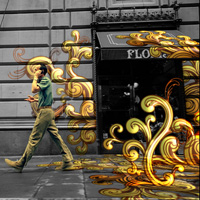
Tutorial Details
- Program: After Effects, Various other plugins & software
- Difficulty: Advanced
- Run Time: 31:08 min
Final Product What You'll Be Creating
In this tutorial Naim Alwan ventures outside of After Effects for a little bit of 3D Matchmoving to create this stunning Urban Jungle effect where vector graphics are perfectly tracked to some city footage. In day 1 you will learn how to do a track using Boujou (although any matchmoving software will work for this) and then import and apply that information in After Effects successfully.
Naim explains:
In this two part tutorial you will learn the workflow for seamlessly integrating live action footage with motion graphics elements.
The first day we are going to be spending a little time familiarizing ourselves with the camera tracking process using Boujou, and the settings we need to get right in order to export an AE camera track.
We will then use the information contained on the nulls to setup the scene. Once the track is imported in AE and scene setup we will shift our focus to Illustrator where we will cover the layer setup we need in order to import an Illustrator file into AE.
Tutorial
Download Tutorial .flv
File size MB
Show Video Transcription
Enjoyed this Post?
Subscribe to our RSS Feed, Follow us on Twitter or simply recommend us to friends and colleagues!

By Naim Alwan
Rollover to read this author's bio or click through to see a full list of posts by this author.
Premium Members
Source Files, Bonus Tutorials & More for all relevant Tuts+ sites in one subscription. Join Now