Create a MoGraph Urban Jungle – Day 1
Tutorial Details
- Program: After Effects, Various other plugins & software
- Difficulty: Advanced
- Run Time: 31:08 min
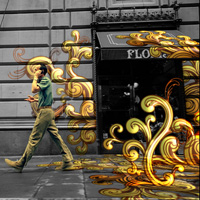
Final Product What You'll Be Creating
In this tutorial Naim Alwan ventures outside of After Effects for a little bit of 3D Matchmoving to create this stunning Urban Jungle effect where vector graphics are perfectly tracked to some city footage. In day 1 you will learn how to do a track using Boujou (although any matchmoving software will work for this) and then import and apply that information in After Effects successfully.
Naim explains:
In this two part tutorial you will learn the workflow for seamlessly integrating live action footage with motion graphics elements.
The first day we are going to be spending a little time familiarizing ourselves with the camera tracking process using Boujou, and the settings we need to get right in order to export an AE camera track.
We will then use the information contained on the nulls to setup the scene. Once the track is imported in AE and scene setup we will shift our focus to Illustrator where we will cover the layer setup we need in order to import an Illustrator file into AE.
Tutorial
Download Tutorial .flv
File size MB
Show Video Transcription
| ||
Enjoyed this Post?
Subscribe to our RSS Feed, Follow us on Twitter or simply recommend us to friends and colleagues!

By Naim Alwan
Rollover to read this author's bio or click through to see a full list of posts by this author.
Premium Members
Source Files, Bonus Tutorials & More for all relevant Tuts+ sites in one subscription. Join Now
172 comments
Sign in with
or register with Disqus
Disqus is a conversation network
- Disqus never moderates or censors. The rules on this community are its own.
- Your email is safe with us. It's only used for moderation and optional notifications.
- Don't be a jerk or do anything illegal. Everything is easier that way.
- see more
I can't wait to try ... no wait... boujou cost $10,000 .... um wtf? What kind "tutorial" is this? Anyone who can afford that kind of software is a professional and already knows how to use it.
This is TUTally useless!
- see more
Or "get it", learn it, and get a job with a "legit" copy, the way I got a job as a broadcast designer with all the software I "got"
-
-
-
-
- see more
Just desire to say your article is as amazing. The clearness on your publish is just cool and i could think you are an expert in this subject.
Well along with your permission let me to take hold of your RSS feed to stay up to date with forthcoming post.
Thank you one million and please continue the enjoyable work. - see more
that was amazing , can't thought that a after effects shows this type of effects i will try it . thanks for sharing . and hope you will share it again and agin .
-

-
 see more
Hey mate! Great tutorial. Just a question, do you have a stutter?
- see more
I thought you did great on your first tutorial!! Very clear and to the point. You definitely need to make more. Very cool subject matter as well. Thank you!
- see more
Just wondering if there is an alternate program I could use instead of Boujou?
- see more
I'll been wondering how to do it in an easy way...thank you for sharing
- see more
Excellent tutorial. Great effect, great explanations, and you have an AMAZINGLY pleasant voice to listen to. Thanks a lot!
-
- see more
Maybe your first tutorial but man you are great! I understood everything. I use AE long time now but i never stepped on Boujou before. Thank you for this great tut...
Keep up the good work of sharing knowledge !!
- see more
where is part 2?? am i missing something or the remaining half isn't uploaded yet?? please i need to watch how you used mocha.
-
-
-
- see more
how do break elements up into layers on illustrator?
- see more
this tut was awesome
but can u plz tel me the plugins downloading sites -

-

-

- see more
very nice - I'm still learning.... I'm happy you posted this tutorial.
-
-
-
- see more
OK i found ma problem after reading some stuff and talking about it whit ma friends i think i know wat the problems is.....the things is every time i shoot a video i have turbulence there for ...the track feature is going to be all around the place instead of going smoothly to the left/right side like its shows in the tutorial (4:48)...so i am guessing this some how affect camera solve thingy ......so yea i need a video whit no turbulence what so ever and see what happen.... and Adam i dont really get what u saying ... u want to give me ur results ? ...as in ur video?...........
- see more
Men......i am really having a hard time whit this tutorial.....GOOD and IMPRESSIVE and i actually have boujou( btw F*****ING EXPENSIVE but i dint buy it XD) but i cant get the pass "camara solve" every time it finish i only have like 10 dots or so of a 40 sec video....I dont know if is the way i am shooting the video.... but if u gut any idea of wat is causing it then i be glad to hear.......
P.S. I am a noobie to most of all this stuff.....but i learn fast....XDD
-
- see more
where is the rest of the tutorial!? it stops after 30 minuts or so... please help!
- see more
I can´t see or download the complete tutorial.Somebody know why?
Thanks - see more
i can´t see or download the complete tutorial.somebody know why?
Thanks
-
 see more
Hey, the tutorial isn't playing more than the first little bit... whats up with that? Technical difficulties?
-
-
-

- see more
helo... muchachos... como estan... tooos de mi parte un gran saludo a todo quienes visiten este link... weno estoy en el mundo de la animacion pero aun me faltan aprender muchos efectos y esto de AE es nuevo pero wenazo gracias por los aporte ......
se lo agradeceria un monton si me ayudan con algunos tutoriales.... weno mi correo es jobs_and_jobs@hotmail.com..... weno desde ya muchas gracias........
-
-
- see more
Aunque mi inglés no es muy técnico, ni soy experto en AE, este tutorial es realmente fantástico, voy a conseguir los plugis, merece la pena invertir tiempo y dinero en este fantástico proyecto. Mil gracias por tu aporte. por favor piensa en traducir tu trabajo en español, también nis gusta trabajar en este tipo de efectos.
Franz -
-
- see more
Your right he is a GEEK, but when he gets in the Octagon thats the last thing you want to call him! Did I forget to mention he was a cage fighter! Go on Naim with your killer tutorials. Whats next?
-
 see more
great tut, but when i import boujou data to the aae, i have only one comp, square comp miss me, when i find it or i have use first comp which Naim delete?
-
- see more
hello Naim Alwan, i don't understood what is name of that programme which you have use on 1:35 min
please tell me bcoz my english is not very good and well - see more
GREAT TUTORIAL, im very interested in learning more of boujou, but there are just a couple of tutorials, THANKS FOR THIS. This was a great help for me.
Would you make another tutorial for learning other features of boujou? like make the track of a scene with a more complex camera movement, for example a circular or maybe you know about other links with video tuts of boujo.
One more time a lot of THANKS!!
-


Full-time, Part-time and Contract Jobs
Freelance Jobs









Aetuts+ is part of the Tuts+ Network, teaching creative skills to millions worldwide.
Aetuts+Copyright © 2013 Envato
Envato