Victor Savkin
on building applications in Angular
Angular 2 separates updating the application model and reflecting the state of the model in the view into two distinct phases. The developer is responsible for updating the application model. Angular, by means of change detection, is responsible for reflecting the state of the model in the view. The framework does it automatically on every VM turn.
Event bindings, which can be added using the () syntax, can be used to capture a browser event execute some function on a component. So they trigger the first phase.
Property bindings, which can be added using the [] syntax, should be used only for reflecting the state of the model in the view.
Updated: July 16, 2015
Example
Let’s look at an example showing the two phases. What we have here is a simple application with a list of tech talks, which you can filter, watch, and rate.
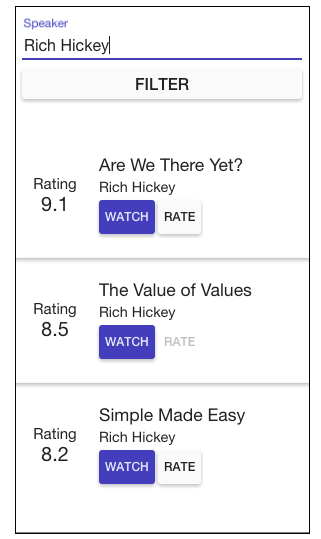
An Angular 2 application consists of nested components. So an Angular 2 application will always have a component tree. Let’s say for this app it looks as follows:

Finally, let’s define the application model that will store the state of our application:
{
  filters: {speakers: "Rich Hickey"},
  talks: [
    {
      id:898,
      title: "Are we there yet",
      speaker: "Rich Hickey",
      yourRating:null,
      rating: 9.1
    },
    ...
  ]
}
Now, imagine an event changing the model. Let’s say I watched the talk “Are we there yet”, I really liked it, and I decided to give it 9.9.
The code snippet below illustrates one way to do it. The handleRate function is called when the user rates a talk. The Talk component just delegates to the App object that updates the model.
@Component({
  selector: "talk",
  properties: ['talk']
})
@View({templateUrl: "talk.html"})
// render a talk object
class TalkComponent {
  talk:Talk;

  constructor(private app:App){}

  handleRate(yourRating:number) {
    this.app.rateTalk(talk, yourRating);
  }
}

@Component({selector: "talks"})
@View({templateUrl: "talks.html"})
//renders a list of talks
class TalksComponent {
  talks:List;

  constructor(mb:MessageBus) {
    mb.onChange((updateModel) => this.talks = updatedModel.get("talks"));
  }
}

// contains the business logic
class App {
  model:Map;
  constructor(private messageBus:MessageBus){}
  rateTalk(talk:Talk, rating:number){
    // model is immutable, so we have to construct a new model object
    var updatedTalk = updateRecord(talk, {rating});
    var updatedTalks = this.model.get("talks").replace(talk.id, updatedTalk);
    this.model = this.model.set("talks", updatedTalks);
    this.messageBus.emit("change", this.model);
  }
}
This example is written using TypeScript 1.5 that supports type annotations and decorators, but it can be easily written in ES6 or ES5. You can find more information on annotations here https://docs.google.com/document/d/1uhs-a41dp2z0NLs-QiXYY-rqLGhgjmTf4iwBad2myzY/edit.
The updated model looks like this:
{
  filters: {speakers: "Rich Hickey"},
  talks: [
    {
      id:898,
      title: "Are we there yet",
      speaker: "Rich Hickey",
      yourRating: 9.9,
      rating: 9.1
    },
    ...
  ]
}
At this point nothing has changed in the view. The DOM has not been updated yet. The model is updated, but did not use property bindings or change detection.
Next, after you are done updating the state, at the end of the VM turn, change detection kicks in to propagate changes in the view.
First, change detection goes through every component in the component tree to check if the model it depends on changed. And if it did, it will update the component. In this example, the first Talk component gets updated:

Then, the framework updates the DOM. In our example, the rate button gets disabled because you cannot rate the same talk twice.

Note, the framework has used change detection and property bindings to execute this phase.
In our example we are using global state and immutable data. But even if we used local state and mutable data, it would not change the property that the application model update and the view state propagation are separated. I will explain why this is important below.
Handling Forms
Angular 2 comes with the Forms module, which is useful for handling input. Say, we have a component responsible for adding talks to our database. This is how we can build it using Forms:
@View({
  template: `
    <form #f="form" (submit)="createTalk(f.value)">
      Title: <input ng-control="title" required>
      Description: <textarea ng-control="description"></textarea>
      Save as draft: <input ng-control="isDraft" type="checkbox" required>
      <button type="Submit">Create</button>
    </form>
    `,
    directives: [formDirectives]
})
class CreateTalkComponent {
  constructor(private app:App) {}

  createTalk(talkData: {title:string, description:string, isDraft:boolean}) {
    this.app.createTalk(talkData);
  }
}
We declare a form object in the template. It has three fields: title, description and isDraft. The title and isDraft fields are required fields, and description can be blank. Then, we bind the form directive to a local variable and use it to pass the data to the component.
Angular 2 also supports the ng-model way of dealing with user input. You can read more about it here.
Why?
Now, when we have understood how we separated the concerns, let’s look at why we did it.
Predictability
First, using change detection only for updating the view state limits the number of places where the application model can be changed. In this example it can happen only in the rateTalk function. A watcher cannot “automagically” update it. This makes ensuring invariants easier, which makes code easier to troubleshoot and refactor.
Second, our reasoning about the view state propagation has been drastically simplified. Consider what we can say about the Talk component just by looking at it in isolation. Since we use immutable data, we know that as long as we do not do talk= in the Talk component, the only way to change what the component displays is by updating the binding. These are strong guarantees that allow us to think about this component in isolation.
It is hard to achieve this kind of guarantee in Angular 1.x.. First, talk=new Talk() could potentially result in cascading changes if the talk were two-way bound to some property on the parent component. Second, since the only Angular 1.x way of dealing with forms is to create an ng-model binding, it would be hard to keep Talk immutable.
Finally, by explicitly stating what the application and the framework are responsible for, we can set different constraints on each part. For instance, it is natural to have cycles in your application model. So the framework should support it. On the other hand, html forces components to form a tree structure. We can take advantage of this and make the system more predictable.
Let me give you one example. Can you tell which directive will be updated first: Parent or Child?
<parent prop1="exp1" prop2="exp2">
  <child prop3="exp3" prop4="exp4"></child>
</parent>
In Angular 1.x the update can be interleaved. How many times prop1 is updated in the same digest run? It can more than 1. This makes implementing certain patterns very difficult. It also makes troubleshooting certain types of problems challenging: the static template just does not give you enough information to see what is going on. You have to know how the model gets updated.
In Angular 2, you know that Parent will always be updated before Child, and we also know that a property cannot be updated more than once.
Angular 2 makes reasoning about the component easier because it limits the number of ways it can be modified, and makes this modification predictable.
Performance
A big part of the separation is that it allows us to constrain the view state propagation. This makes the system more predictable, but it also makes it a lot more performant. For example, the fact that the change detection graph in Angular 2 can be modelled as a tree allowed us to get rid of digest TTL. Now the system gets stable after a single pass.
How Does Angular Enforce It?
What happens if I try to break the separation? What if I try to change the application model inside a setter that is invoked by the change detection system?
Angular tries to make sure that the setter you define for you component only updates the view state of this component or its children, and not the application model. To do that Angular will check your bindings twice in developer mode. First time to propagate changes, and second time to make sure there are no changes. If it finds a change during the second pass, it means that one of your setters updated the application model, the framework will throw an exception, giving you the feedback you need to ensure it runs properly in production.
What About Angular 1.x?
Although Angular 1.x was not built with this separation in mind, you can still write your code in this way to make your migration easier. Here’s a few things you can do:
- Prefer one-way data-bindings to two-way data-bindings.
- Do not update application state inside watch functions.
- Be explicit about how data flows in your application. For example, try to implement unidirectional data-flow. Read more about it here.
Summary
- Angular 2 separates updating the application model and updating the view.
- Event bindings are used to update the application model.
- Change detection uses property bindings to update the view. Updating the view is unidirectional and top-down. This makes the system a lot more predictable and performant.
- Angular 2 embraces unidirectional data-flow.
- You can use the same mindset when building Angular 1.x applications.